STUTTER ISLAND
User Manual · v1.0 · Stigma Audio
01Overview
Stutter Island is a rhythmic performance effect: slices, repeats, glitches, build-ups and breakdowns — triggered live, locked to the host tempo. At its core is the Gesture: a combination of effect modules (stutter, gate, pitch, filter, delay…) stored on a pad. 16 pads per bank, 4 banks, and a musical randomizer so you never start from a blank page.
- Formats: VST3, Audio Unit (macOS) — a MIDI-controlled effect — and a Standalone app.
- macOS 11 or later, universal binary (Intel + Apple Silicon); Windows 10/11, 64-bit. Tested in Ableton Live 12, Logic Pro and djay Pro (Mac).
02Installation
macOS. Double-click the .pkg installer and follow the steps. It is signed
and notarised by Apple: no warning. It installs the VST3 and the Audio Unit into
/Library/Audio/Plug-Ins (VST3 and Components), and the Standalone
app into /Applications.
Windows. Run StutterIsland-1.2.3-Windows-Setup.exe. The installer is not
code-signed yet: Windows shows "Windows protected your PC" — click More info, then
Run anyway. It installs the VST3 into C:\Program Files\Common Files\VST3 and the
Standalone into C:\Program Files\Stigma Audio\Stutter Island.
Then restart your DAW. If it doesn't see the plugin, rescan (Live: Preferences → Plug-Ins; Logic: Plug-in Manager).
Activate your licence. Until activated, the plugin runs in demo mode: ten minutes on the very first launch, then 50 seconds per load, before the sound mutes. To activate: click DEMO at the top right, type the email address you bought with and the licence key from your order, then Activate. An internet connection is needed for this step only. The key covers three computers; to move it, open the same window and click Deactivate first.
03MIDI routing per DAW
Stutter Island processes a track's audio and receives MIDI to trigger the Gestures. This is the only setup step that needs a minute of attention:
Ableton Live
- Insert Stutter Island (VST3) on the audio track to process.
- Create a MIDI track. In MIDI To, pick the audio track, then Stutter Island in the second menu — Live then lists “1-Stutter Island” through “16-Stutter Island”: those are the 16 MIDI channels, and the plugin listens to all of them. Just pick “1-Stutter Island”.
- Arm the MIDI track: notes C1–D#2 trigger the 16 pads.
Logic Pro
- Create a software-instrument track and load Stutter Island from AU MIDI-controlled Effects → Stigma Audio.
- In the plugin header, choose the Side Chain input: the audio track to process.
- Play notes C1–D#2 on the instrument track.
04Interface tour

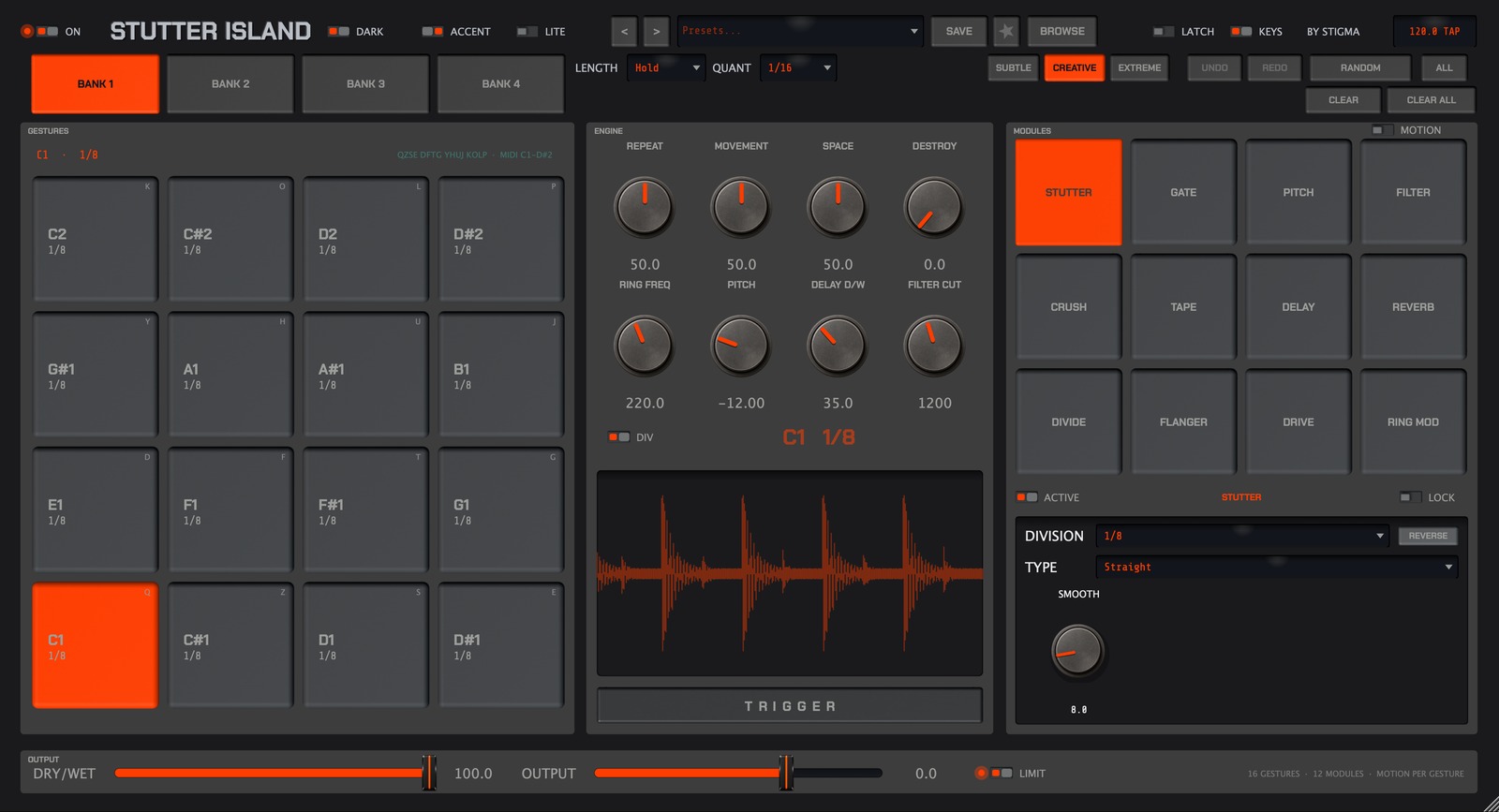
Left to right in the header: the ON switch (global bypass), the look switches (DARK, GREEN, LITE), preset navigation and management (‹ ›, SAVE, favorite ★, BROWSE), LATCH, KEYS, and the tempo screen: BPM when the host provides it, TAP when the plugin keeps its own tempo, SYN when it follows an incoming MIDI clock, LNK when the Standalone sits in an Ableton Link session (see section 15).

Below: the BANK 1–4 buttons, the playing settings (LENGTH, QUANT), the randomize intensity (SUBTLE / CREATIVE / EXTREME), UNDO/REDO, RANDOM, ALL, CLEAR and CLEAR ALL.
The faceplate is organized in three columns: GESTURES (the pads), ENGINE, and MODULES (+ MOTION when its switch is on).
05Gestures
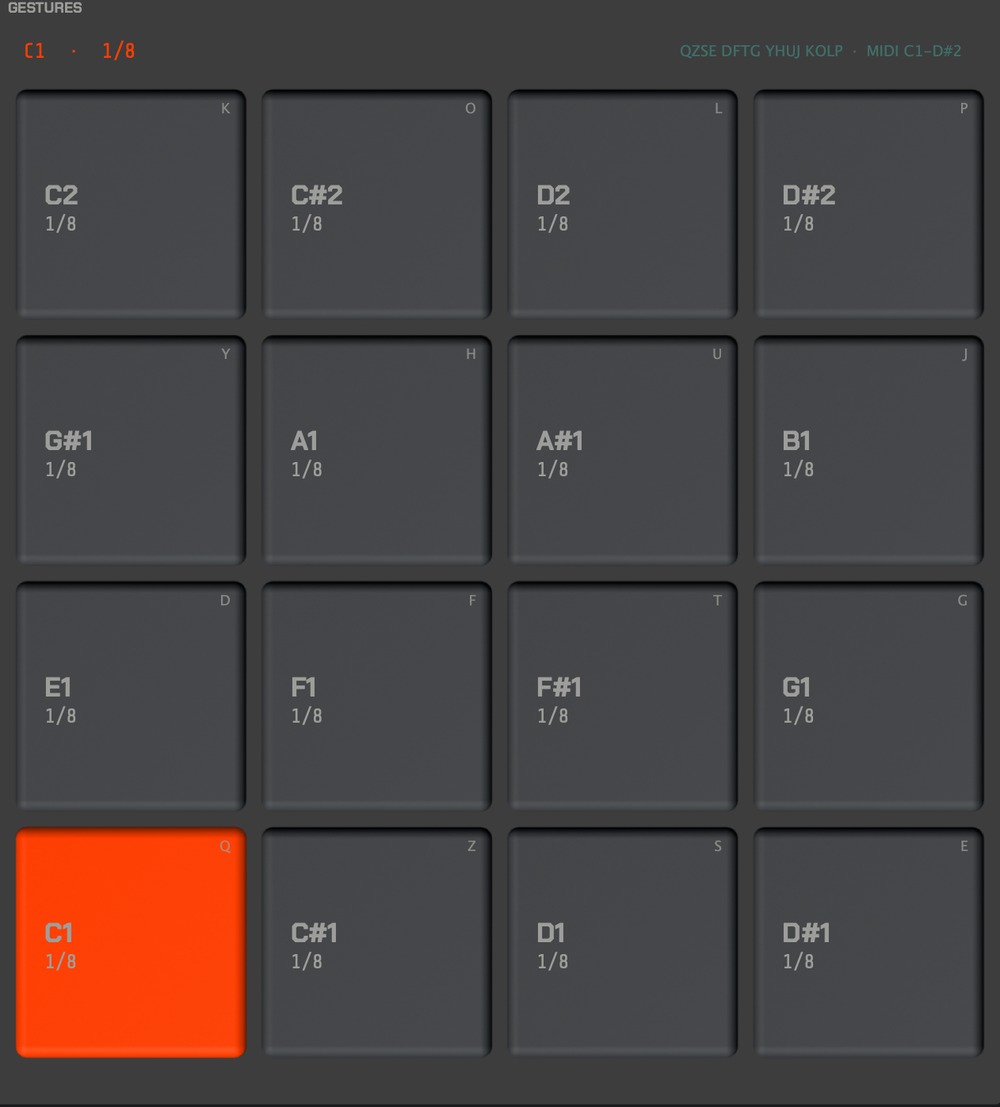
Each pad holds a Gesture: its name (the MIDI note), its rhythmic division, and its keyboard shortcut in the pad's top-right corner. The selected pad (accent color) is the one the Engine and the modules edit.
- Trigger: MIDI note (C1–D#2), click, or keyboard key. The effect applies for as long as the note is held.
- LENGTH: on Hold, the Gesture plays while the pad is held; on a fixed length (1 bar…), a single tap is enough — the effect always plays out in full (to cut early: retrigger, or Clear).
- LATCH (Hold mode only): releasing lets the Gesture finish the current bar instead of cutting dead.
- QUANT: trigger quantization (1/16 by default) — pads always start in time.
- Right-click a pad: randomize that pad. ALT+right-click: reset it.
06The Engine
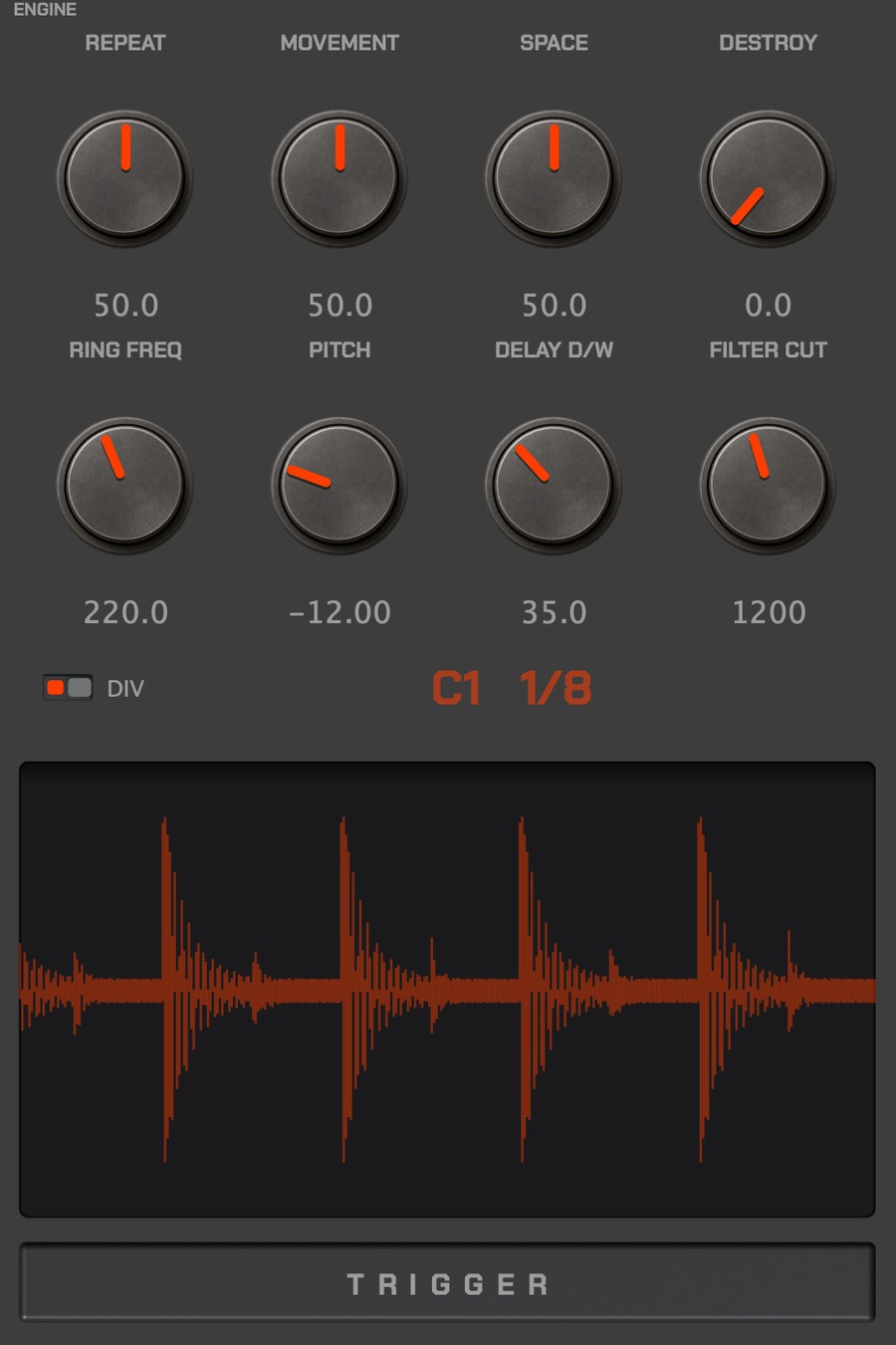
Two rows of four macro knobs shape the selected Gesture:
| Knob | Role |
|---|---|
| REPEAT | density of repeats / slices |
| MOVEMENT | internal motion (sweeps, variations) |
| SPACE | space: delay and reverb |
| DESTROY | degradation: crush, drive, ring mod |
| RING FREQ | ring modulator frequency (Hz) |
| PITCH | transposition (semitones) |
| DELAY D/W | delay mix |
| FILTER CUT | filter cutoff (Hz) |
Below the knobs: the DIV switch (divided tempo / half-time), the selected Gesture's screen (name + division), the waveform visualizer, and the TRIGGER bar — a large mouse-playable pad, handy for auditioning.
07The 12 modules
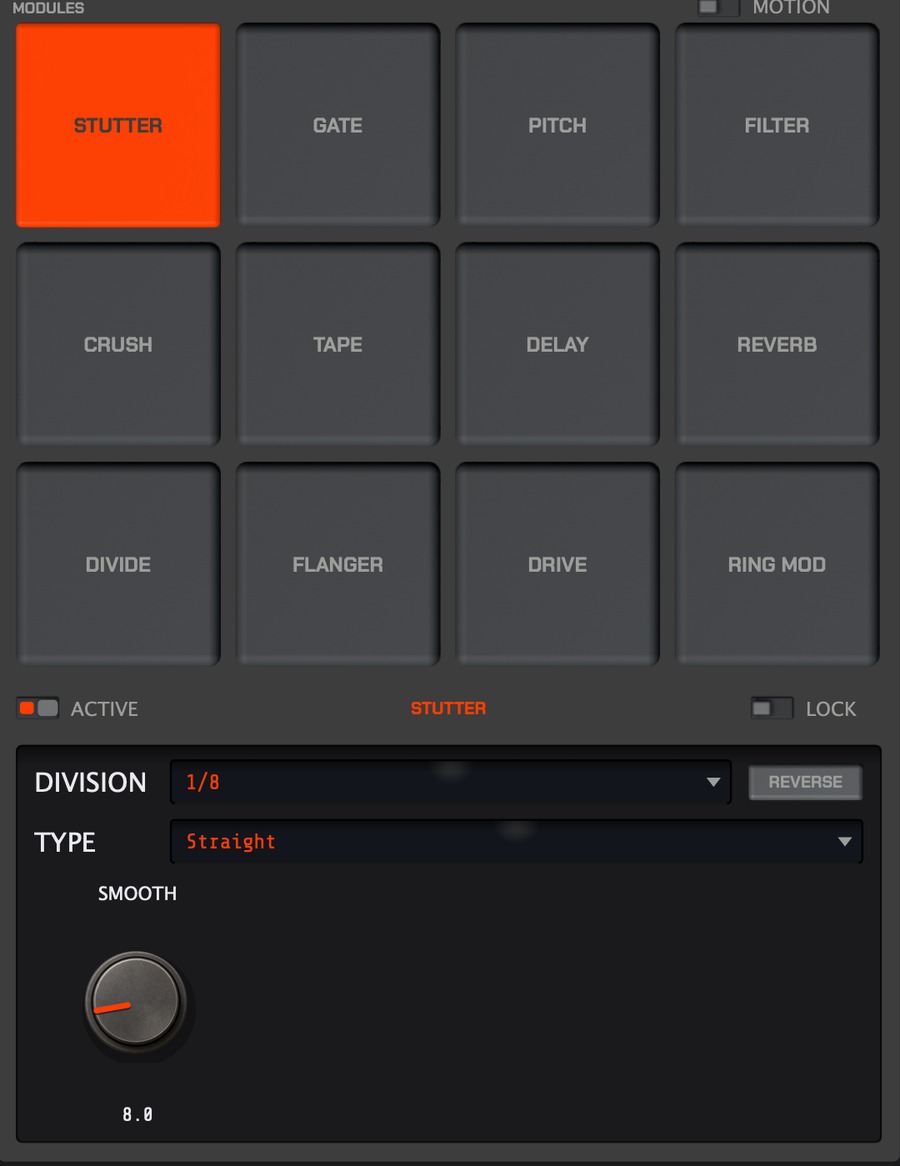
The MODULES column is the sound engine room: 12 effects, each engageable per Gesture, each with its own settings page.
| STUTTER | GATE | PITCH | FILTER |
| CRUSH | TAPE | DELAY | REVERB |
| DIVIDE | FLANGER | DRIVE | RING MOD |
Click a module to open its page: the ACTIVE switch engages it in the selected Gesture, and the settings below are its own (e.g. STUTTER: DIVISION, TYPE Straight/Triplet/Dotted, SMOOTH, REVERSE). The LOCK padlock protects a module's settings from Random rolls.
08Motion
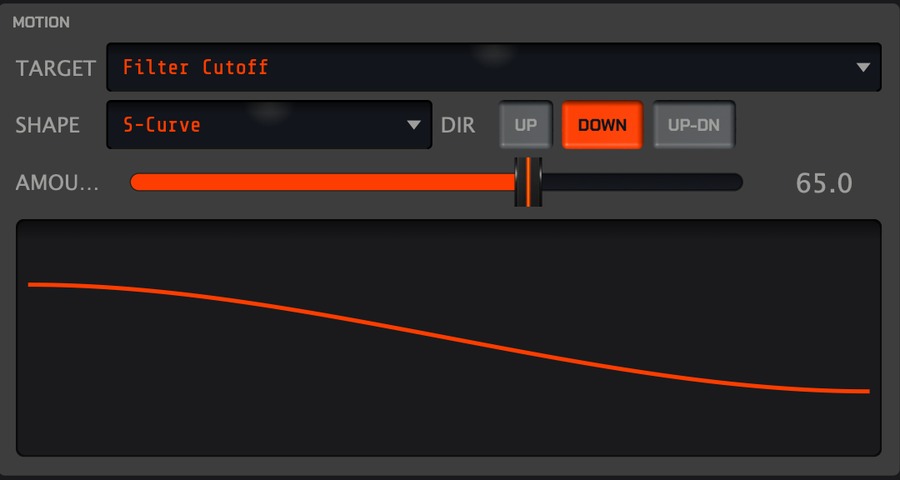
Motion adds a per-Gesture automation curve: while the pad is held, one target evolves along the chosen shape. Enable the bay with the MOTION switch (top of the MODULES column — when off, MODULES expands into its place).
- TARGET: Off, Filter Cutoff, Pitch, Gate Depth, Crush Mix, Delay Mix, Volume.
- SHAPE: Line, Accel, Decel, S-Curve, Impulse, Random.
- DIR: Up, Down, Up-Dn — AMOUNT: depth of the movement.
09Random & Generate
Stutter Island's randomizer is musical: divisions weighted toward useful values, consonant pitch intervals, a minimum of active modules per Gesture.
- RANDOM: re-roll the selected Gesture. ALL: the whole bank.
- Intensity: SUBTLE (discreet), CREATIVE (balanced), EXTREME (radical).
- Locked modules (LOCK) keep their settings through the rolls.
- CLEAR / CLEAR ALL: back to defaults (no randomness).
- UNDO / REDO: every roll can be undone.
10Presets
BROWSE opens the browser: search, categories, favorites ★. SAVE stores your own presets; ‹ › step through the list. The A / A>B buttons compare two plugin states before you commit. A preset contains all 4 banks — Gestures, modules and Motion included.
11Banks
Four banks of 16 independent Gestures (BANK 1–4): prepare, say, a "verse" bank, a "chorus" bank, a "breaks" bank and an "experimental" bank, and switch scenes with one click — the selected position carries over between banks.
12MIDI Learn
Right-click a pad, any of the 8 ENGINE knobs or a BANK button to open the MIDI Learn menu.
- Pads: the next note you play becomes that pad's trigger — one assignment covers the same position in all 4 banks. “Restore the original note” returns to the C1–D#2 mapping.
- Knobs and banks: CC or note (notes in use by the pads are refused and the learn stays armed — just play another one).
Mappings are remembered machine-wide (midi-mappings.xml):
learn once, they hold in every project. They never travel inside a preset — yours can't
overwrite someone else's controller.
13Output section

DRY/WET blends processed and original signal (100% = effect only). OUTPUT sets the overall level. LIMIT engages a safety limiter — recommended live, as extreme Gestures can spike.
14Looks: Dark, Skin, Lite
- DARK: switches the whole chassis between dark and light themes (factory look, orange).
- SKIN: the looks menu. Factory look goes back to stock; three skins
ship with the plug-in — Light Mint (the mint accent of earlier versions),
Fluo Green and Fluo Full — followed by your own. Load file…
loads a
.stutterskinfile and files it in the Skins folder; Show Skins folder opens that folder in the Finder or Explorer. DARK still works under a skin: it forces a black chassis whatever the skin's chassis colour, and keeps the rest of the skin. Purely visual. - LITE: compact vertical faceplate — the 16 pads, banks, 8 knobs and the visualizer, everything else hidden. Ideal live or on a small screen.
Make your own. At stigmaaudio.com/plugins/stutter-island/skin:
five colours (accent, chassis, bays, pads, modules), an optional background image with its
opacity, under the chassis and/or the bays, a live preview on the real panel, then
Download .stutterskin. Knobs keep their colour: they are photographs. Load the file
with SKIN → Load file…, or drop it in the Skins folder
(~/Library/Application Support/Stigma Audio/Stutter Island/Skins on macOS,
%APPDATA%\Stigma Audio\Stutter Island\Skins on Windows).
The window resizes freely (locked ratio); size, theme and skin are stored with the session — the skin by its file name: if the file leaves the folder, the plug-in falls back to the factory look.
15FAQ
The pads don't react to MIDI. Check the routing (section 03): the MIDI track must target the plugin itself, not just the audio track, and be armed.
The computer keyboard triggers random things in Live. Live's computer MIDI keyboard and the plugin's shortcuts can overlap: disable one of the two (KEYS button on the plugin side).
No sound in Standalone. The standalone app processes the audio input chosen in its preferences: pick your interface and an input source. macOS then asks for microphone access, even for an audio interface; accept.
What tempo outside a DAW? Without a host the screen reads TAP: click it in rhythm to tap the tempo, or drag vertically to fine-tune (0.2 BPM per pixel, 0.01 with Shift). If a MIDI clock arrives on the MIDI input, the plugin follows it automatically and the screen switches to SYN, with tempo and phase; it falls back to TAP one second after the clock stops. This applies to djay Pro, which loads the plugin (Mixer → Main Output Effect) without passing it any tempo.
Ableton Link (Standalone). The standalone app has an ABLETON LINK button (tools row, left of CLEAR). Enabled, Stutter Island joins the Link session on your local network — Ableton Live, djay Pro, any Link-enabled app — and takes its tempo and bar phase from it: the screen reads LNK, the button's tooltip shows the number of peers. Tapping or dragging the screen then proposes a tempo to the whole session. On first use macOS asks for local-network access: accept it, or no peer will be seen. Link exists in the Standalone only: as a VST3/AU the plugin follows the host's tempo, as Ableton recommends. For djay Pro this means the Standalone running next to djay gives beat-locked gestures; the plugin loaded inside djay stays on TAP.
Hearing the effect with djay: the virtual audio cable. Link carries tempo, not audio. For the Standalone to process what djay plays, send it the sound through a virtual cable: BlackHole on macOS (free, a bare driver with no app: it only shows up as a "BlackHole 2ch" device), VB-Cable on Windows. Three settings: djay's main output → the cable; the Standalone's input (Options → Audio/MIDI Settings) → the cable; the Standalone's output → your speakers or audio interface. Keep the same sample rate everywhere (44.1 or 48 kHz), otherwise the OS resamples on the way. The cable copies the audio untouched; it only adds one buffer of latency, which does not affect timing since Link provides the phase. In this setup Stutter Island sits in series on djay's whole mix, not on a single deck.
Other DJ software. The same recipe works with every app that speaks Ableton Link: Traktor Pro (LINK button in the header, native since 3.0; Traktor 4: Settings → Sync → Ableton Link), Serato DJ Pro (Link button, top left, with SYNC and Snap to Beatgrid enabled in the preferences and your Serato hardware connected), rekordbox (since 6.0, Performance mode only — not Export mode with CDJs) and VirtualDJ (the "Ableton Link" extension, Settings → Extensions). None of them hosts plugins on the master: it is always the Standalone next to the app, Link for tempo, the virtual cable for audio. Mixxx has no released Link support yet. Setups where the sound never leaves the software — CDJs in Export mode, vinyl DVS — are out of reach for now.
The effect doesn't land on the beat. Raise QUANT (1/16 or more): the trigger waits for the next subdivision.